IntakeQ
$54.90Forms Only, per month, includes 2 assistant accounts
Best for small practices wanting intake only, not a full platform
- Free plan
- No
- Rubric
- 8.0 of 10
Nine tools, ranked by fit for the practice in front of them, with the price each one actually charges to collect patient paperwork before the visit.

IThe short answer
IntakeQ is the best patient intake software for small practices that want forms only, at $54.90 per month on the Forms Only plan. Phreesia suits larger practices and health systems digitizing check-in, and NexHealth suits groups that need intake synced to live scheduling; both quote pricing on request. Prices in this list were checked on November 25, 2026. I ranked nine tools by fit for the buyer each entry describes, not by a single score, so a $29.90 forms tier and an enterprise check-in platform can both appear here.
9 tools compared from vendor pages on November 25, 2026. 5 publish a starting price we could read; the rest say "See website".
IITop three berths
Register order is editorial fit for the buyer each entry describes. Prices are the starting figures read on November 25, 2026.
$54.90Forms Only, per month, includes 2 assistant accounts
Best for small practices wanting intake only, not a full platform

See website
Best for larger practices and health systems digitizing check-in

See website
Best for practices wanting intake synced with live scheduling
How this page is paid for. All 9 tools here are unpaid editorial picks.
A paid listing's position can be part of what the vendor pays for. Every entry, paid or not, is scored on the same rubric and keeps its limits in print. Advertising disclosure.
IIIThe register
Starting prices as shown on each vendor's pricing page on November 25, 2026. "See website" means no figure we could confirm.
| No. | Tool | From | Free plan | Trial | Rubric | Actions |
|---|---|---|---|---|---|---|
| 01 | IntakeQsmall practices wanting intake only, not a full platform | $54.90Forms Only, per month, includes 2 assistant accountsUpdated on vendor page | No | 14-day free trial | 8.0 | |
| 02 | Phreesialarger practices and health systems digitizing check-in | See websiteNot shown publicly | No | No | 7.1 | |
| 03 | NexHealthpractices wanting intake synced with live scheduling | See websiteNot shown publicly | No | No | 7.1 | |
| 04 |  JotformHIPAA forms without buying a clinical platform | $99Gold, per month, billed annuallyRead on vendor page | No | Free Starter plan | 6.5 | |
| 05 |  Formstackintake with document generation and approval workflows | $83Forms, per month, paid annually, 1 Builder userUpdated on vendor page | No | 14-day free trial | 6.1 | |
| 06 |  SimplePracticemental health practices that get intake built in | $49Starter, per month, billed monthly, temporary promo $14.70 per month for 12 monthsRead on vendor page | No | 30-day free trial | 7.8 | |
| 07 |  Weavepractices bundling forms with patient communications | $199starting price, per monthRead on vendor page | No | No | 6.5 | |
| 08 |  Tebraindependent practices wanting intake plus growth tools | See websitecustom quoteQuote only | No | No | 6.8 | |
| 09 |  Arondental offices wanting intake plus AI phone answering | See websiteNot shown publicly | No | No | 6.5 |
Pinned:
IVMethod
How much of the pre-visit paperwork the tool handles, from branded templates to signatures and automated reminders.
How intake data reaches the record the practice already runs, whether by native sync, file export or middleware.
Whether a business associate agreement and HIPAA controls are available on the plan a small practice can actually afford.
Whether pricing is published, what the entry tier includes, and how quickly the monthly bill climbs.
How long a practice waits before the first patient sees a form, including implementation fees and training load.
VMethod
Every tool here was scored on the same five criteria: intake depth, EHR fit, compliance terms, price clarity and setup effort. The weighting puts the most on intake depth, because a forms product that misses signatures or reminders creates more work than it removes, and on EHR fit and compliance, because those decide whether the data is usable and lawful once it leaves the form.
Prices come from each vendor's own pricing page, checked on November 25, 2026, plus the plan notes supplied with this comparison. Where a vendor publishes no figure, the entry says pricing is on the vendor site and quotes no number. That is why several entries carry a quote-based model and no dollar amount, and why the dental bundle and the therapist platform are judged on different budgets.
Scores are a reading aid, not the running order. The order is editorial: each entry is written for the buyer it fits, and a dental office consolidating phone service is not competing with a solo counselor buying forms only. Every entry is scored on the same rubric, with the same cons listed.
I did not test every product hands-on. Features, limits and plan contents come from vendor documentation and pricing pages, and the weaknesses listed are the ones a buyer will actually hit: submission caps, tier gating for HIPAA terms, implementation fees and the absence of native EHR sync. Confirm current terms with the vendor before you sign, because plan names and prices move between buying cycles.
The full routine, from price reads to corrections, is on the methodology page. Paid listings follow the advertising disclosure.
Entry I of IX / Forms-only focus
Our verdict
Best for small practices that want branded forms, signatures and a HIPAA agreement at $54.90 per month, with no platform attached.
IntakeQ is the cleanest fit for a practice that needs pre-visit paperwork and nothing else. The Forms Only plan is $54.90 per month and includes 2 assistant accounts, so a two-person front desk can both build and send forms. You get unlimited form templates with practice branding, e-signatures for clients and providers, automated reminders that chase unsigned packets, and secure document sharing instead of email attachments. A HIPAA business associate agreement is included at that entry price, which is the detail that matters most when you compare it with a general form builder.
The tier structure rewards light use and punishes growth. A low volume Forms Only plan at $29.90 per month covers practices sending ten or fewer submissions monthly, and the submission cap is the catch: once you pass it, the standard $54.90 plan is the cheaper route. Scheduling, booking and payment collection sit on the Practice Management tier at $79.90 per month, so budget for that tier if you want a booking widget or a client portal rather than plain forms.
The real limit is what happens after the patient hits submit. Intake data leaves as PDF, CSV or a Dropbox export, and there is no native EHR sync. Someone files it, or an integration tool moves it. For a solo therapist or a small chiropractic office running a lightweight record system, that is a five-minute job. For a clinic with a full EHR and a compliance lead, it is a workflow you have to design, document and keep an eye on.
Buy it when intake is the whole problem and your volume is modest. Skip it once you need scheduling, billing and a record that updates itself without staff work.
You want compliant, branded forms at $54.90 per month and your staff can file an export.
You need bookings, payments or a record that updates itself from the form.
Entry II of IX / Check-in automation

Our verdict
The strongest check-in platform for large groups, with eligibility and payments tied to intake, but no published price and an enterprise sales cycle.
Phreesia is built for organizations where the front desk is a bottleneck with a budget attached. Patients complete intake on their own phone before the visit, and the submitted data feeds insurance eligibility verification and payment collection in the same pass, so staff are not retyping demographics into one system and checking coverage in another. Digital self-check-in, a digital front door and patient flow analytics round it out, and the platform integrates with major EHR and practice management systems.
That breadth is the product. The case rests on throughput: fewer minutes per check-in, cleaner eligibility results, copays collected before the patient leaves. A practice that only wants a branded intake form ends up paying for verification, payments and front-desk reporting it will not open.
Pricing is the sticking point. There is no public price list, and the buying process is an enterprise sales cycle with a quote, a scoping call and an implementation plan. Cost scales with organization size and the modules you take. For a hospital department or a multi-site specialty group, that process is normal and the implementation support is worth the wait. For a three-provider practice, the procurement overhead alone can outlast the patience of whoever is running it.
The reporting is the underrated part. Patient flow analytics show where check-in stalls across sites, which is the question a regional group actually asks. A solo practice rarely has enough volume for the data to mean anything.
Fit it to organizations with a billing office and a compliance team. Small practices should look at IntakeQ or a bundled platform before booking a demo, because the sales process alone will cost more time than their entire forms decision.
You are a multi-site group or health system that wants check-in, eligibility and payments in one flow.
You are a small practice wanting forms and a published price.
Entry III of IX / Live EHR sync
Our verdict
Premium choice for practices that need intake written straight into the EHR in real time, provided the implementation fee fits the budget.
NexHealth sells a patient experience layer, and intake forms are one part of it. Forms, online booking, automated reminders, two-way messaging and payment collection all write back to the same patient record in real time, which means a form filled in at 9pm changes the chart, the appointment and the balance without a staff member touching any of them. Real-time EHR synchronization with major systems is the feature that carries the product. No-show reduction workflows and multi-location support are built for groups running several schedules at once.
The trade is cost and scope. The entry price is the highest among the tools compared here, and implementation is typically quoted at $500 to $3,000 on top of subscription cost, so the first-year number sits well above the monthly rate. Nothing in the plan is sold as intake only: you buy the platform whether or not you use booking and messaging on day one.
Where it earns the money is a practice that has been stitching a form tool to an EHR with Zapier and a part-time administrator. When the record updates itself, the reconciliation work disappears along with the errors it produced, and the front desk stops being a data entry desk.
Where it does not is a solo practice with simple paperwork and a fixed budget. A single-provider office paying implementation fees for a platform it uses at a fraction of capacity is overbuying, and IntakeQ or SimplePractice covers the same ground for less. Ask for the implementation quote in writing before you compare subscription figures, because the two numbers move independently.
Fit single and multi-site groups with a real scheduling problem and an EHR worth syncing to.
Retyping intake into your EHR is the daily frustration you want gone.
You need forms only and cannot absorb an implementation fee.
Entry IV of IX / Template library

Our verdict
The cheapest route to a HIPAA-ready form builder at $99 Gold, if you accept Zapier in place of native EHR sync.
Jotform is the answer when the requirement is a good form and the practice is not ready to buy clinical software. The drag-and-drop builder needs no technical skill, the template library covers healthcare and general paperwork, and conditional logic keeps long packets short by hiding questions that do not apply. E-signature fields, payment fields and more than 150 third-party integrations are there, and the free Starter plan handles non-clinical forms such as event signups or feedback surveys.
The compliance line is the thing to understand before you build anything. HIPAA controls, encrypted storage and a business associate agreement start at the Gold tier, which is $99 per month billed annually and $129 month to month. Bronze and Silver sit below it and exclude those features, so they are not an option for patient data however attractive the price looks. Gold is the cheapest compliant choice in this product line.
Jotform is not an EHR connector. There is no native sync, so the route into your record runs through Zapier, webhooks or a manual export. That works, and plenty of small practices run it, but it is a chain with more links than a bundled platform, and it needs an owner who will notice when a link breaks. Budget an hour a month for checking that submissions still arrive.
The templates are why people stay. A dental history form, a consent packet and a satisfaction survey can all be cloned and edited in an afternoon, and the free tier lets you test the builder before you commit to a compliance plan.
Buy it if you want control over the form itself and you accept the integration work. Skip it if the front desk cannot maintain an automation, or if you want scheduling and billing from the same vendor.
You want a flexible, cheap builder and can own the Zapier connection into your record.
Nobody on staff will maintain the automation or you need native EHR sync.
Entry V of IX / Document generation
Our verdict
Wins when intake ends in a generated document and a multi-party approval, but full HIPAA tooling sits on custom Enterprise plans.
Formstack is a forms and workflow product rather than a clinical one, and that shows in the best way when paperwork involves more than one signature. Conditional logic and multi-step approvals let you build a consent packet that routes to a guardian, then a clinician, then records, with each step logged. Document generation turns submitted answers into a populated PDF, so a completed intake produces a chart-ready document without a human retyping it. E-signature workflows handle multi-party packets, and submission limits per form keep volume visible.
The Forms plan starts at $83 per month paid annually for 1 Builder user, which is steep for plain form collection. Documents and e-signatures require the Suite plan at $299 per month for three users. Practices that need those features usually have complex consent requirements, and for them the suite price is defensible against the staff time it saves on packet assembly.
Compliance is where healthcare buyers need to slow down. Deep HIPAA controls are reserved for custom Enterprise plans, so the published tiers do not carry the full set. A practice collecting patient data on Forms or Suite should confirm in writing which compliance features its chosen tier includes before the first form goes out, and should get the business associate agreement before the demo ends. That conversation is not optional, and it is the main reason Formstack lands mid-list for clinical intake despite strong workflow tools.
A 14-day trial is long enough to build one real packet and route it end to end, which is the only test worth running. Do that before you compare it with a cheaper builder.
Buy it if your intake ends in a generated document and an approval chain. Skip it for simple patient forms where a builder with a published HIPAA tier will do.
Your intake has to produce a signed, generated document that several people approve.
You need a standard patient packet with a published, affordable compliance tier.
Entry VI of IX / All-in-one subscription

Our verdict
The obvious pick for US mental health practices that want intake, portal, telehealth and billing in one $49 subscription.
SimplePractice is the pragmatic choice for mental health practices, because intake arrives inside software they were going to buy anyway. The Starter plan at $49 per month billed monthly includes built-in intake forms, a client portal, secure document sharing and messaging, scheduling and telehealth video. Insurance claims sit on higher tiers. Essential is $79 per month and Plus is $99, and Plus adds group scheduling. A 30-day free trial is longer than most here, which matters if you want to build a packet and test the portal with a real client.
The commercial catch is that intake cannot be bought on its own. You subscribe to a practice platform and use the forms that come with it. For a solo therapist or counselor, that is the right trade: one login, one bill, one place where the intake, the note and the invoice live. For a practice already running an EHR it likes, there is no reason to switch just for forms, and no way to buy only the forms side.
Add-ons change the arithmetic. AI notes cost $35 per clinician per month and e-prescribing costs $49 plus a setup charge, so a fully loaded subscription sits noticeably above the headline rate. Availability is limited to the United States.
One pricing note: the plan currently carries a temporary promotional rate of $14.70 per month for 12 months under a Small Business Saturday discount. The standard Starter price remains $49, so budget on the standard number and treat the discount as a first-year reprieve rather than the real cost.
Buy it if you are in mental health and want intake, notes, telehealth and billing in one subscription. Skip it outside the US, or if forms are the only thing you need.
You are a US mental health practice that wants one subscription for intake, notes and video.
You run a non-US practice or already like your EHR.
Entry VII of IX / Communications bundle
Our verdict
A communications bundle that happens to include forms: good value when it replaces phone and texting, poor value when it does not.
Weave bundles intake forms into a communications platform, and the bundle is the entire argument. Alongside digital forms you get a VoIP phone system, two-way texting, automated appointment reminders, online scheduling, payment collection and review generation, all syncing with major practice management systems. Dental offices get the strongest integrations, and the review tools are a real operational feature rather than a checkbox: reminder and follow-up messages run automatically after the visit.
Pricing is quoted per location and starts around $199 per month, with higher tiers priced on request. Two costs sit outside that headline. Contracts run annually, and a setup fee near $750 lands in the first year. Because pricing is per location, a group with four sites multiplies the number rather than spreading it, and add-ons push first-year cost above the advertised rate.
The value calculation is straightforward. If Weave replaces your phone provider, your texting tool, your reminder service and your form subscription, $199 per location plus setup can come in under the sum of the parts, and you get one support line instead of four. If you already have a phone system you like, you are paying for a bundle to use one component.
That makes it a poor fit for a practice that only needs patient paperwork. IntakeQ at $54.90 or SimplePractice at $49 covers forms for a fraction of the cost, without an annual contract.
Buy it if you are consolidating communications and forms under one contract, especially in dental. Skip it if intake is the only gap in your stack and the phone system is fine.
You want one vendor for phones, texting, reminders, reviews and intake.
Your phone system works and forms are your only gap.
Entry VIII of IX / One-vendor stack

Our verdict
A credible single-vendor stack for independent practices, held back by quote-only pricing and scope that goes well past intake.
Tebra is the broad option: intake forms and patient check-in sit on top of an EHR with clinical charting, medical billing and claims, online scheduling, reputation management, patient communications and practice performance reporting. It exists because Kareo and PatientPop merged, and the result is aimed at independent practices that would rather buy the administrative stack from one vendor than assemble it from four.
The fit question is whether you want that stack. A practice already running a separate EHR and a separate billing service will find the breadth harder to justify, and the intake module, competent as it is, does not carry the purchase on its own. A practice replacing a patchwork of tools, or moving off paper for the first time, gets onboarding support and one number to call when something breaks.
Budget is the constraint on planning. Tebra publishes no starting figure and routes all pricing through a tailored quote, so you cannot put a number in next year's plan until sales has scoped your configuration, provider count and modules. That is normal for platform vendors and frustrating for a two-provider office trying to compare options in a week.
There is also a scope risk. Broad platforms invite you to buy modules you open once, and a quote structure makes it hard to see which line items you actually need. Ask for the quote broken out by module, and ask what happens to your intake data if you leave, before you sign anything.
Buy it if you want one vendor for intake, records, scheduling and billing, and you are willing to run a sales process. Skip it if you have a working EHR and one clear gap to fill.
You are replacing several administrative tools and want one vendor relationship.
You need a price this week or already have an EHR you like.
Entry IX of IX / AI phone answering
Our verdict
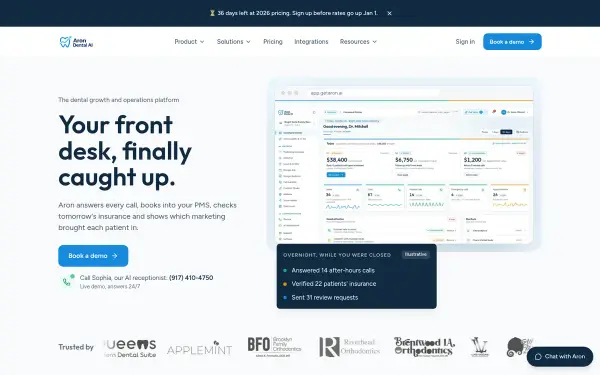
Built for dental offices that want forms written into the PMS plus after-hours AI answering, at a price that starts well above forms tools.
Aron is a dental-first product, and the design shows where it matters most. Completed forms write directly back into the practice management system, so the chart updates without the front desk retyping anything. On top of that it bundles a 24/7 AI receptionist, VoIP phone service, online booking, automated reminders and two-way texting, with a business associate agreement available. For a dental office that loses calls after 5pm, the phone answering is the feature that pays for the subscription.
Pricing is described as published rather than quoted, and the notes supplied with this comparison list Basic at $399 per month, Pro at $799 per month and a custom Elite tier. No live pricing page could be fetched on November 25, 2026 to confirm those rates, so treat them as indicative and ask for a current quote. Either way the entry point sits far above a forms-only tool, and there is no free tier or self-serve trial to test with first.
The implementation footprint is larger than a form subscription. Phone numbers port, call flows need designing, and the AI receptionist needs tuning against your real scheduling rules before it goes live in front of patients. That is a project with a start and a finish, not an afternoon.
The specialty limit is the other consideration. General medical practices and behavioral health groups sit outside the design target and will find the dental workflows a poor match, even though forms and phone features are technically general purpose. The integration depth that makes it good in dentistry is exactly what makes it narrow elsewhere.
Buy it if you run a dental office that wants forms, phones and after-hours answering from one vendor. Skip it for general medicine, or if intake forms are all you need.
You run a dental office losing calls after hours and want forms written into the PMS.
You practice general medicine or need only a form builder.
VIBackground
Patient intake software collects the information a practice needs before a visit and moves it somewhere useful. That covers the new patient packet (demographics, insurance, medical history, consent signatures) plus the shorter re-check forms an existing patient fills in each year or each episode of care. The software replaces the clipboard, the PDF emailed back and forth, and the staff member who retypes handwriting into the record.
The category splits into three shapes. First, dedicated forms tools that do one job: build a form, send it, collect a signature, store the result. IntakeQ and Jotform sit here, and so does Formstack with heavier workflow. Second, patient experience platforms where intake is one module among booking, messaging and payments, which is where NexHealth and Phreesia live. Third, full practice platforms that include intake because they include everything, as SimplePractice and Tebra do.
What separates a good buy from a bad one is rarely the form builder. It is what happens next:
Buyers also mix up patient intake with patient scheduling and with referral intake. Scheduling decides when the visit happens. Referral intake brings documents from another practice. Intake software handles the paperwork the patient completes, and its output should feed both the schedule and the chart.
For a small practice the practical test is a stopwatch. Time how long it takes a patient to complete your current packet on a phone, then time the staff work to file it. If the total is under fifteen minutes, a standalone forms tool at $54.90 per month is plenty. If it is over an hour, the problem is integration, and you should look at platforms where intake, booking and the record share one patient identity.
This comparison sits in the software register. Further along the shore: baby tracking app and kennel software.
VIIPricing
Pricing in this category follows four models, and the model tells you more than the sticker number. A flat monthly forms subscription is the simplest to budget and the easiest to outgrow. A builder that gates compliance behind a higher tier keeps the entry cheap and moves the real cost up. A bundled practice platform spreads cost across features you may not open. An enterprise suite quotes per organization and adds implementation.
| Model | How it bills | Typical fit | Example from this list |
|---|---|---|---|
| Flat forms subscription | Per month, with a capped lower tier | Small practices wanting intake only | IntakeQ Forms Only at $54.90 per month |
| Tiered form builder | Per month, cheaper when billed annually | Practices building their own forms | Jotform Gold at $99 per month, billed annually |
| Bundled practice platform | Per month, tiered by features, add-ons extra | Practices replacing several tools | SimplePractice Starter at $49 per month |
| Communications bundle | Per location, per month, annual contract | Offices consolidating phone and texting | Weave starting at $199 per month |
| Enterprise check-in suite | Quote, plus implementation | Hospitals and multi-site groups | Phreesia and Tebra, both quote based |
Three patterns are worth watching. Compliance tiers come first: Jotform's HIPAA features begin at $99 Gold and Formstack's deep controls sit on custom Enterprise, so the useful price is rarely the advertised entry price. Implementation comes second: NexHealth quotes $500 to $3,000 on top of subscription, and Weave adds a setup fee near $750. Add-ons come third: SimplePractice lists AI notes at $35 per clinician monthly and e-prescribing at $49 plus a setup charge.
For scale, the cheapest compliant forms option here is IntakeQ's $29.90 low-volume tier, capped at ten submissions a month, or $54.90 without the cap. The most expensive entry point is a platform quote you cannot see until you ask, which is why several vendors publish no starting figure at all.
Each entry card shows the starting price as it appeared on the vendor's own pricing page on November 25, 2026. When a vendor shows no figure we could confirm, or only a promotional rate, the card says "See website" or gives the regular price instead of a guess. Usage, overage and add-on rates in the text change more often than plan prices, so confirm them on the vendor page before you set a budget. To test the numbers against your own volume, try the free User Research Budget Planner. The Event Break-Even Calculator is a second way to check the same decision.
VIIIDecision
IXPitfalls
XQuestions
IntakeQ's low volume Forms Only tier at $29.90 per month is the cheapest compliant option here, capped at ten submissions monthly. Above that cap, the standard Forms Only plan at $54.90 includes the HIPAA business associate agreement and 2 assistant accounts. Jotform's free Starter plan is cheaper still but cannot be used for patient data, because HIPAA controls start at the $99 Gold tier.
A dedicated forms tool runs from $29.90 to $99 per month: IntakeQ at $54.90, Jotform Gold at $99 billed annually. A bundled platform can start lower and climb higher: SimplePractice Starter at $49 per month, Weave from $199 per location. The bundle costs more but replaces other subscriptions, so compare the total you pay today rather than the entry line.
IntakeQ includes one on Forms Only at $54.90 per month. Jotform includes one at Gold, $99 per month billed annually, and not on Bronze or Silver. Aron lists a business associate agreement as available. Formstack reserves deep HIPAA controls for custom Enterprise plans, and the other vendors publish no compliance detail, so ask for the agreement before the demo.
Patients open a link sent by text or email and complete the packet in a browser, signing with a finger on the screen. Phreesia also supports self check-in and a digital front door for patients who arrive on site. IntakeQ and Jotform both support mobile completion with e-signature fields. Test your own packet on a mid-range Android handset, because long forms without conditional logic get abandoned halfway.
It depends on the tool. NexHealth and Phreesia write into the record in real time. Aron writes back into dental practice management systems. IntakeQ exports PDF, CSV or Dropbox files for manual filing. Jotform has no native EHR connection and relies on Zapier or webhooks. SimplePractice and Tebra keep intake inside their own record, so data arrives there only if you use their charting.
Usually no. If your platform already includes forms, a client portal and a record, adding a forms vendor creates a second copy of patient data and a reconciliation job for someone. Buy separately when the platform's forms are genuinely weak, when you need specialty packets it cannot build, or when a platform migration runs for months and intake cannot wait.
XIFurther along the shore
Vendors can ask for a correction or apply for a Featured listing. Paid or not, the entry is scored on the same rubric and its limits stay in print. Partner with Umberlake.
Free tools
Our free browser tools turn the prices on this page into a figure for your own volume. Nothing you type leaves your device.